> For the complete documentation index, see [llms.txt](https://faq.rollercoin.com/rollercoin/llms.txt). Markdown versions of documentation pages are available by appending `.md` to page URLs; this page is available as [Markdown](https://faq.rollercoin.com/rollercoin/f.a.q./events/freon-event/17.-what-is-a-freon-event.md).
# 17. What is a Freon Event?
**Freon** is a mechanic that can massively improve your bonus power. Depending on your upgrades, and hamster parameters, this system can push your global bonus **up to 6500% across all rooms**.
**With this feature, Hamsters can do more than go on Expeditions.** They can work inside the **Service Room**. Assign them to the new **Cooling System** and activate a temporary power boost that amplifies your entire setup.
This is a limited time event built around pure, scalable power. You collect Freon, upgrade the system, and decide how far you want to push your global % bonus.
## How it works?
At its core, **Freon is a special event resource** that you pour into the **Cooling System** to get a global % bonus on all your rooms.
The maximum bonus from Freon (not all Cooling Station) is 5000%. This requires 500 000 Freon in total.
{% hint style="info" %}
Every **100 Freon** stored inside the Cooling System tank gives **1% bonus** to your total mining power by default.
{% endhint %}
By upgrading the **Freon Loading Efficiency module**, you improve this conversion rate. At max level, the same 100 Freon can count for much more, reaching **up to 10% bonus per 100 Freon**.
Also, over time, a small portion of the Freon in your tank naturally evaporates, slightly reducing your bonus. These leaks happen only once every few hours. Still, you can upgrade your modules to **slow leaks down** and **reduce the amount lost**.
## How to get Freon?
During the event, you collect Freon from several activities in the game, mainly:
* **Exchanging crypto to RLT**: every time you convert crypto to RLT while Freon is active, you get Freon as a bonus, similar to cashback.
* **Shop bundles and offers**: some event bundles in the Store will include Freon as an item.
* **Lootboxes**: specific lootboxes can drop Freon as part of their reward pool.
## How to use Freon?
Freon you earn goes first into a separate **Freon balance**, displayed on the Freon event screen. From there, **you choose when to transfer it into the Cooling System tank**.
Inside the Service Room, on the Freon interface, you simply press the **Fill** button. When you do this, the game:
* takes Freon directly from your Freon balance
* moves **as much as possible** into the Cooling System tank, up to your current Freon limit
* keeps any extra Freon safely in your balance for later use
This keeps the process simple: **you collect Freon, press one button, and the system automatically fills itself with the maximum it can handle.**
## Hamsters in Freon
You can turn your hamsters into temporary power boosters. After unlocking duty slots through the Hamster Slots module, you can assign them to work inside the Cooling System.
While on duty, the hamster gives you an extra global % bonus based on its **base stats only**. **Abilities do not affect duty performance**.
Here’s how the bonus is calculated:
* Add the hamster’s base stats
* Multiply that total by your Hamster Parameter Efficiency module
{% hint style="info" %}
At the maximum, every **1 point of Hamster parameters** gives **2% bonus** to your total mining power by default.
{% endhint %}
For example, **Uncle Hamster** in Maximum Upgrade:
* Health 85 + Strength 85 + Luck 30 = **200 total stats**
* **200 stat points in total**. With the maximum upgrade, this Hamster grants a **200 x 2** = **400 % bonus** while on duty.
If you want to push your final % bonus above the Freon cap, **hamsters are essential**.
When you place a hamster in a duty slot, it stays there for several hours. Duty is **always successful**. There’s no chance to fail or lose rewards. When duty ends, the hamster must rest, just like after a successful expedition. During duty, the hamster also charges its Ultimate Ability every hour.
## Cooling System Upgrades
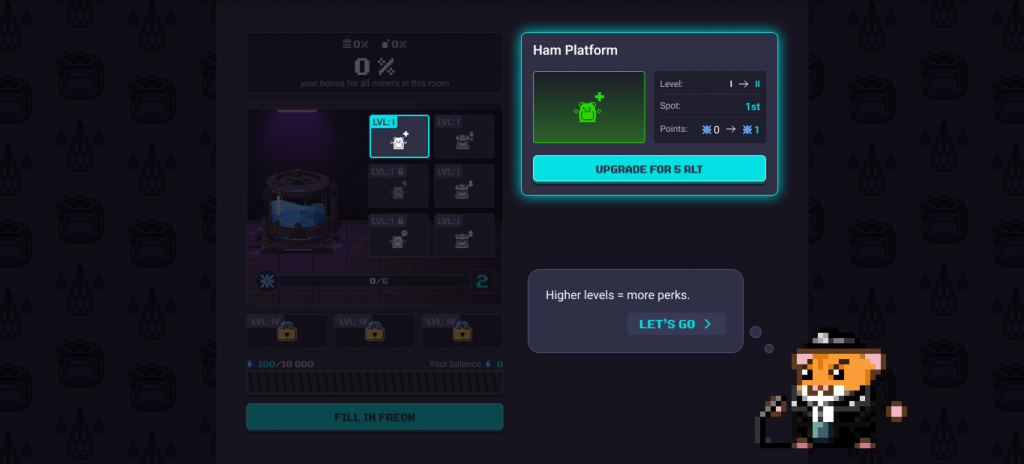
The **Cooling System** is the heart of the Freon event. It lives inside the Service Room and determines **how much Freon you can store, how strong your bonus becomes, and how efficiently the whole mechanic runs**.
The system has **4 levels**, and each new level dramatically increases your Freon capacity and maximum possible % bonus.
Cooling System Level
Freon Limit
Max Bonus
Level 1
5,000 Freon
50%
Level 2
50,000 Freon
500%
Level 3
150,000 Freon
1500%
Level 4
500,000 Freon
5000%
You don’t level it up directly. Instead, **you upgrade modules**, and each **module adds points that raise the overall level**.
## Cooling System Modules
Each module has **4 levels**, each upgrade costs **RLT**, and each one directly affects how Freon works or how hamsters perform inside the system.
As you upgrade modules, your **Cooling System automatically levels up**, unlocking higher Freon capacity and much bigger global % bonuses. Below is what each module does:
* **Ham Platforms**. Unlocks up to 3 duty slots. Without upgrading this module, hamsters cannot enter the Cooling System.
* **Ham Efficiency**. Multiplies the hamster stats that count toward your bonus. Higher levels = much stronger hamster contributions.
* **Duty Time**. Increases how long each hamster stays on duty. Longer duty = longer bonus before they rest.
* **Freon Leak Amount**. Reduces the % of Freon lost during each leak cycle.
* **Freon Leak Time**. Controls how often leaks occur. Higher levels = fewer leak events.
* **Freon Efficiency**. Makes each 100 Freon more valuable. At max level, 100 Freon can give up to 1.1% instead of 1%.
{% hint style="info" %}
This is where strategy comes in: **You choose whether to focus on efficiency, leak control, hamster power, or raw capacity**.
{% endhint %}
Each module also gains specific stats as you upgrade it:
Module
Lvl 1 (base)
Lvl 2
Lvl 3
Lvl 4
Ham Platforms
0
1
2
3
Ham Efficiency
x0.25
x1
x1.5
x2
Duty Time
6 hours
12 hours
18 hours
24 hours
Freon Leak Amount
-5%/round
-4%/round
-3%/round
-2%/round
Freon Leak Time
6 hours
12 hours
18 hours
24 hours
Freon Efficiency
–
+2.5%
+5%
+10%
## Important Details to Know
* **Freon bonuses do not affect league progression**. They increase your earnings, not league rank.
* **The mechanic is available for a limited time only**. When the event ends, the Cooling System, Freon currency and all bonuses are removed.
* Once Freon is injected into the Cooling System, it cannot be withdrawn or undone.
* Stored Freon slowly leaks over time. **Upgrades can reduce how often leaks happen and how much is lost**.
* Hamsters assigned to the Cooling System are locked during duty and cannot be used in Expeditions.
* After duty ends, hamsters must rest, just like after a successful Expedition.
* Only base hamster stats are used during duty. **Ultimate Abilities do not affect performance**.
* Hamsters still gain XP and charge their Ultimate Ability while working.
* Freon is not tradable and cannot be sold or transferred.
---
# Agent Instructions
This documentation is published with GitBook. GitBook is the documentation platform designed so that both humans and AI agents can read, navigate, and reason over technical content effectively. Learn more at gitbook.com.
## Querying This Documentation
If you need additional information that is not directly available in this page, you can query the documentation by asking a question.
Perform an HTTP GET request on the following URL with the `ask` and `goal` query parameters:
```
GET https://faq.rollercoin.com/rollercoin/f.a.q./events/freon-event/17.-what-is-a-freon-event.md?ask=&goal=
```
`ask` is the immediate question: it should be specific, self-contained, and written in natural language.
`goal` is what the user is ultimately trying to achieve, the reason they need the answer. Sharing it helps GitBook give you a better, more relevant answer. A goal is most helpful when it describes the outcome the user wants rather than restating the question. For example, with `ask=how do I create an API token`, a goal like `automate deployments from our CI pipeline` lets GitBook tailor the answer to that use case.
The response will contain a direct answer to the question and relevant excerpts and sources from the documentation.
Use this mechanism when the answer is not explicitly present in the current page, you need clarification or additional context, or you want to retrieve related documentation sections.